
Your current status: 
Your status will automatically change when you are on a call…or get off a call unless you have manually selected your own status.
Changing your Status
Click the down arrow beside the online status indicator on UniVoIP App, and select the desired online status.
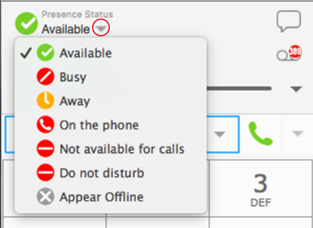
Status Indicators
You can create a custom status indicator: click the down arrow beside the status indicator, and double-click on one of the existing indicators; type your custom status.
|
Indicator |
Meaning for your Status |
Meaning for Others |
|
|
Either: • You have set your status to this value. • UniVoIP App has determined that you are logged on but not on the phone or idle. When you have this status, UniVoIP App will automatically detect when you are idle or on the phone, and change the status to match. |
You can contact this person. |
|
|
You have set your status to this value. UniVoIP App will never automatically switch you out of this status; you must switch yourself. |
You can contact this person. |
|
|
You have set your status to this value. UniVoIP App will never automatically switch you out of this status; you must switch yourself. |
You can contact this person. |
|
|
Either: • You have set your status to this value. In this case, UniVoIP App will never automatically switch you out of this status; you must switch yourself. • You started a phone call when your status was “Available”. When your call finishes, your status reverts to “Available”. |
You can contact this person. |
|
|
You have set your status to this value. UniVoIP App will never automatically switch you out of this status; you must switch yourself. |
You cannot contact this person. |
|
|
You have set your status to this value. UniVoIP App will never automatically switch you out of this status; you must switch yourself. |
You cannot contact this person. |


|
|
You have not moved or clicked the mouse or pressed a keyboard key for the Idle period. To set the Idle period see Softphone > Preferences > Application. As soon as you click the mouse or keyboard, your status changes to “Available”. |
You can contact this person. |
|
|
You have set your status to this value. The other person sees you as offline, even though you are actually online. The other person cannot tell the difference between this status and you really being offline. |
The contact is either not logged on or does not want to share online status. |
|
No icon |
Not applicable |
You are not watching the other person’s status. |

