
To view the History, Click on the History Icon, or go to the menu bar and choose View > Show History.
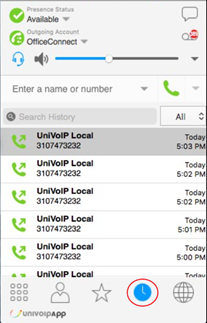
Up arrow: Outgoing call

Down arrow: Incoming call-answered

Red: Incoming call-missed

Managing the Lists of Calls
You can Control-Click on an entry in a list to:
-
Delete the entry.
-
Delete all entries in the list.
-
Edit the profile if the entry is a contact.
-
Add as contact. The Contact Profile appears.
Phoning from History
You can:
-
Double-click to place an audio call.
-
Control-Click on an entry to place a call to this person, using the contact method that was used for this call.