Call History (iPhone)


Tap the History Icon in the bottom panel.

   worddavb2da14df34daa78ea6b2fb7cc03646bb.png


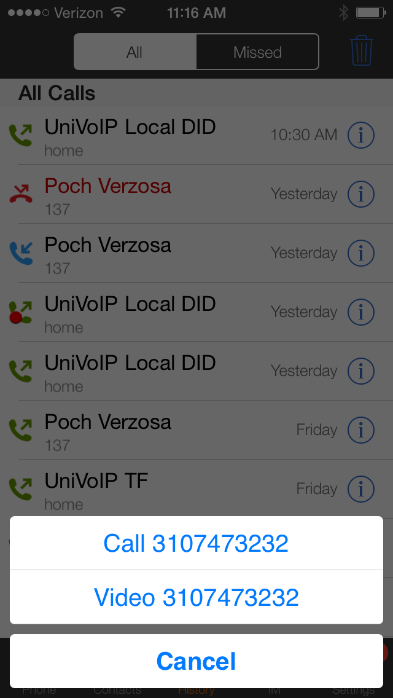
Each call entry will show one of these four icons:

  • Incoming call that was answered.

         worddavc34de7c85e0cf581c0ea0cdcdbeb0394.png

  • Missed incoming call.

         worddav64e2052ae31e857f93f9334742f8e0b4.png

  • Outgoing call.

         worddav29903b7143d7347ce3618074f98a12c1.png

  • Red dot = recorded call

         worddavd84cc34803667ad32f60581d517f7b74.png


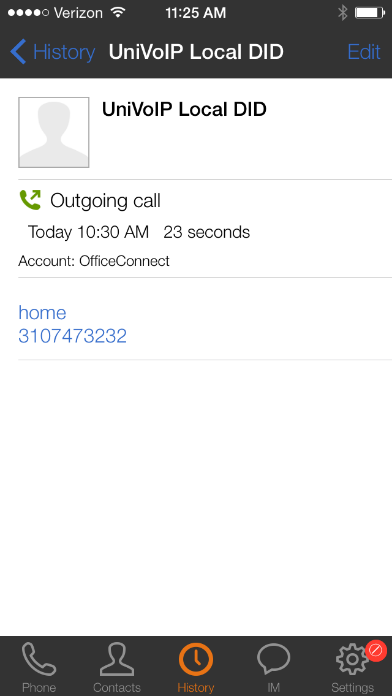
After tapping on an entry, you can tap the number in the pop up to place a call to it. You can also tap the Information Icon to see more information.
 

worddavc275082f14b207738734179f929304a5.png                   worddavcd2195c60ebdad0e564c0f007ef695bd.png                    worddav41ecb6a5052e2cb3e25d51c881084d56.png