
Before using the voice mail features of your system, familiarize yourself with your telephone.
-
Message key - Used to call the Voicemail system and access your mailbox.

-
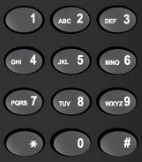
Keypad - Used to make menu selections within the voice mail system.
-
Message light - Used to indicate when you have new voice messages in your mailbox


-
Softkeys - Used to select many of the voice mail menu options. To select a menu option that appears in the telephone display, you can press either the associated context-sensitive softkey that appears in your phone's digital display or the keypad digit for the option.

Please note: The softkey names may differ slightly depending on your telephone. For example, the Del (delete) softkey may appear as the Discard softkey.
Back to the Enterprise Edition Voicemail Guide Menu