
When you access your mailbox to retrieve your messages, the system tells you how many messages you have.
Accessing the Voice Mail Menu
After you access your mailbox, press 8 
Playing Your Messages
After accessing the Voice Mail menu, press 7 
Please note: If the date and time option is enabled on your voice mail system, the system will automatically play this information at the beginning of each message.
While Listening to a Message
At any time during message playback you can:
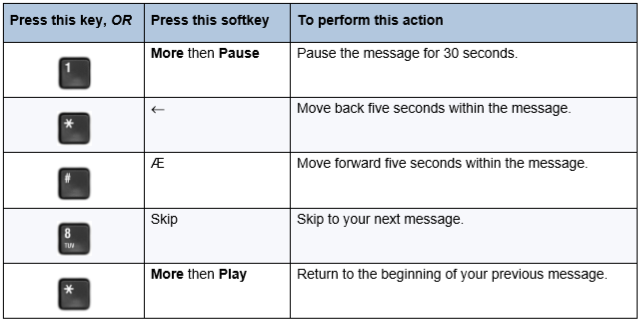
Please note: You may not have access to all of the options above, depending on how your mailbox is configured.
When You Have Finished Listening to a Message
At the end of a message, you can:
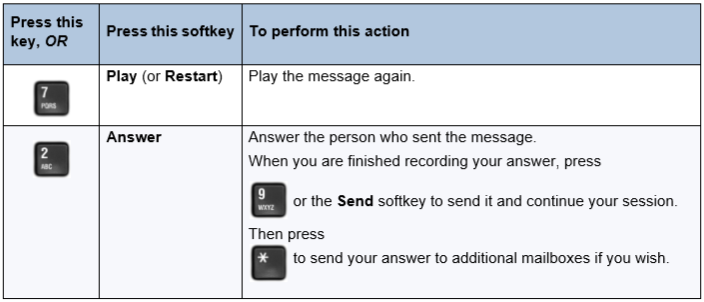
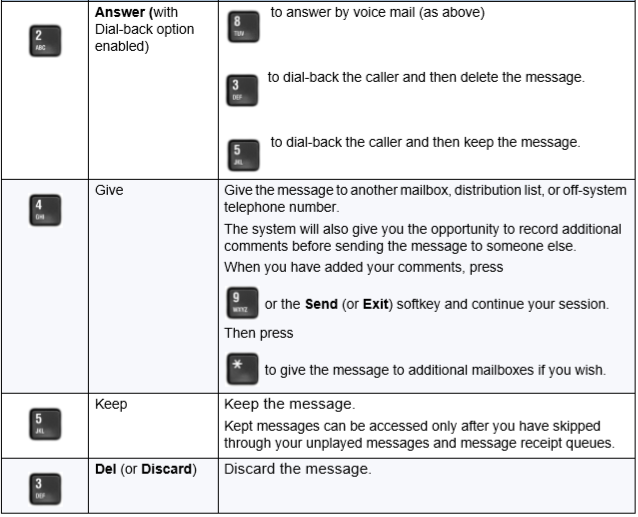
Please note: If you accidentally discard a message, you can retrieve it by immediately pressing the Star Key 
Back to the Enterprise Edition Voicemail Guide Menu