
The user options menu allows you to listen to the user tutorial, change your greetings, record your name, and define your password and create voice mail distribution lists.
Accessing User Options and User Tutorial
Press 8 

Greetings, Name and Passcode
When you first set up your mailbox, you recorded a greeting and your name and selected a passcode. The user options menu allows you to change these at any time. You should update your greeting(s) regularly - for example, to let callers know whether you're in or out of the office.
From the user options menu, you can:
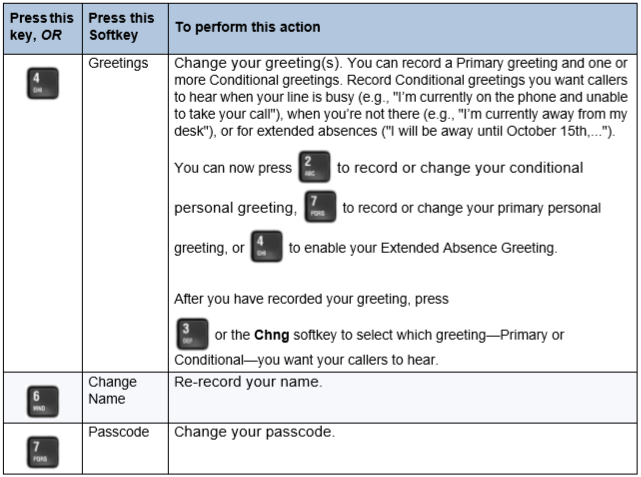
Please note: You may not have access to Conditional greetings, depending on how your mailbox is configured. Consult your System Administrator for more information.
Distribution Lists
A distribution list allows you to record a single message and then send it to a large number of people without addressing them each individually. You can use distribution lists whenever you make a message, or give a message to someone else.
Creating or Modifying a Distribution List:
1. Press 5 
2. Enter the number of the distribution list, ensuring the first digit is always zero (0).
3. Press 6 
4. Press 2 

5. Enter the numbers or names of users you wish to add or drop.
6. Press 7 
7. Press 9 
Please note: All personal distribution lists must begin with the number 0.
Using a Distribution List
Instead of entering a mailbox number, enter the number of the distribution list you want to use. The system reads back the number of the distribution list.
Back to the Enterprise Edition Voicemail Guide Menu