
A tenant with a large number of resources to manage can subdivide responsibilities into groups, and assign a Group Administrator to maintain, change and delete resources assigned to that group.
Users with permissions to edit groups can view the Group page under Extensions and Routing.
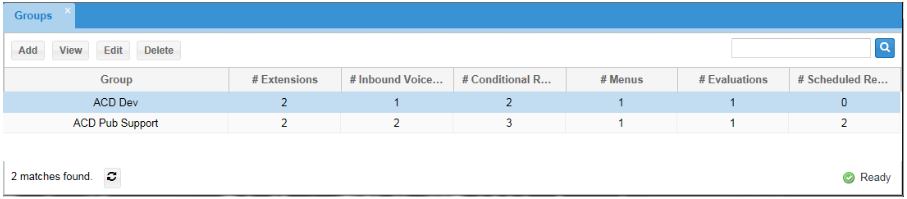
Field Definitions
• Group: the name assigned to the group.
• # Extensions: the number of extensions assigned to the group.
• # Inbound Voice Queues: the number of inbound voice queues associated with the group.
• # Conditional Routes: the number of conditional routes associated with the group.
• # Menus: the number of menus associated with the group.
• # Evaluations: the number of evaluations associated with the group.
Actions
• Add: Click the Add button to create a new group.
• View: Select a group from the list displayed below the Group heading and click the View button to review the settings for a group without making any changes.
• Edit: Select a group from the list displayed below the Group heading and click the Edit button to change any of the group parameters.
• Delete: Select a group from the list displayed below the Group heading and click the Delete button to delete the group.
|
Once the Delete button is clicked, the group is immediately deleted. |
|---|
Add or Edit a Group
Click Add to create a new group or click Edit to update the settings for an existing group. Use any of the following tabs to add or edit elements of the group:
• Extensions
• Inbound Voice Queues
• Conditional Routes
• Menus
• Evaluation Forms