
Browsers
The user interface is accessed through a web browser. UniVoIP will provide all CCS Admins with the proper URL and login credentials. The recommended browsers are as follows:
-
Internet Explorer 10 and above
-
Microsoft Edge (Internet Explorer 12)
-
Chrome 17 and above
Navigation bar, menus, and sub-menus
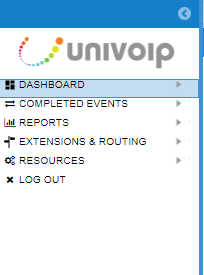
Once logged in, the Navigation bar appears on the left side. Menu items that have right-facing arrows can be clicked to display a sub-menu. Clicking on a sub-menu item displays the selected function to the right of the Navigation Bar. Please note: Some of the visible options may not be supported as part of the available feature set.
General user interface information
Tabs
Tabs are provided at the top of the page to work with multiple views. Some new tabs open automatically when you click a sub-menu, link or button. To close a tab, click the x in the upper right corner.
Please Note: While most browsers have a Back button, the best practice is to avoid using it. Instead, to change views, click a new option or click x to close the current tab.

Links
Links appear in blue text. The cursor changes form when hovering over them.
Buttons
Buttons are used throughout the application. The buttons listed below are some of the most commonly used.
Add: To create a new item, like a new evaluation form.
Cancel: To abandon all of the new or changed entries without saving them to the database. You will be prompted to confirm that you want your entries deleted. Pressing Yes removes your entries and populates the window with the last saved entries.
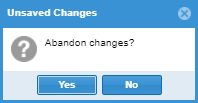
Please Note: The Cancel button does not close the active window. To exit a window, select the X in the upper right corner.
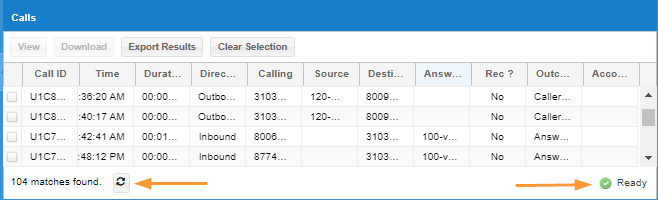
Refresh: Use the Refresh button to load the most current values into a window.
Ready: The Ready button appears in the lower right corner and indicates that the window is active.
Required Fields
Configuration pages often have fields that must be filled in for the new data to be accepted. Required fields have a red asterisk (*) in front of the field name.
Searches
Many web pages present opportunities to search for specific data. When trying to match a string of letters or digits, use an asterisk to match any possible substring. For example, searching for *Jones* matches "Jones Real Estate" and "2125551234 Robert Jones, Jr."
Tool Tips
Tool Tips are a form of online help providing a brief description of a field. Hover your mouse pointer over the field and, if a Tool Tip is available, a short description or prompt appears. Tool Tips are not available for every field.
Sorting Based on a Column
Click on the column header to sort data on an individual page listing. Clicking a second time reverses the sort order.
Back to Top Menu - Extension Call Recording
Back to Top Menu - Contact Center Services