
To activate a phone you need the following:
-
IP Phone
-
Valid Extension Number
-
Updated Phone PIN
The administrator can provide you with an extension and a Phone PIN
To activate your phone, follow these steps:
-
Disconnect your computer from the network
-
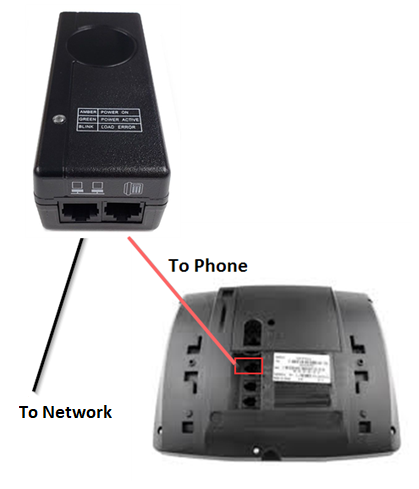
Plug the phone into the network. (Note: If using a PoE Injector, see schematic below)
-
Plug the computer into the phone at the port marked PC
-
Wait for the Information Display Area to show "Logged Out" (this may take 30 seconds or more):
-
Press Activate
-
Enter your extension
-
The Information Display Area prompts you for your PIN:
-
Enter your PIN, followed by Enter
The phone will now display your extension number, and
You have successfully activated the phone and can make calls.
See Quick Set-up for information about initial settings you should configure through the web interface.