
Programmable Keys
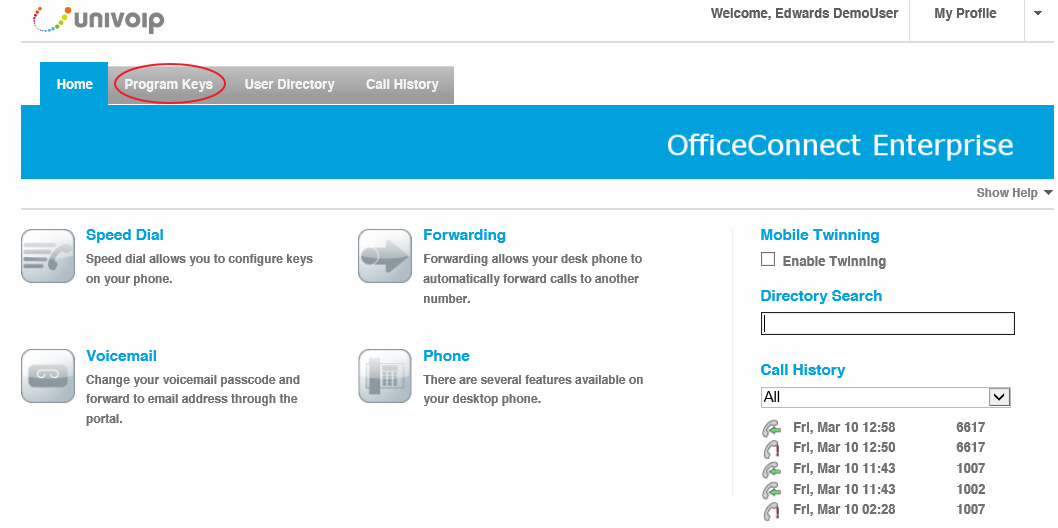
Click on the Programmable Keys Button.
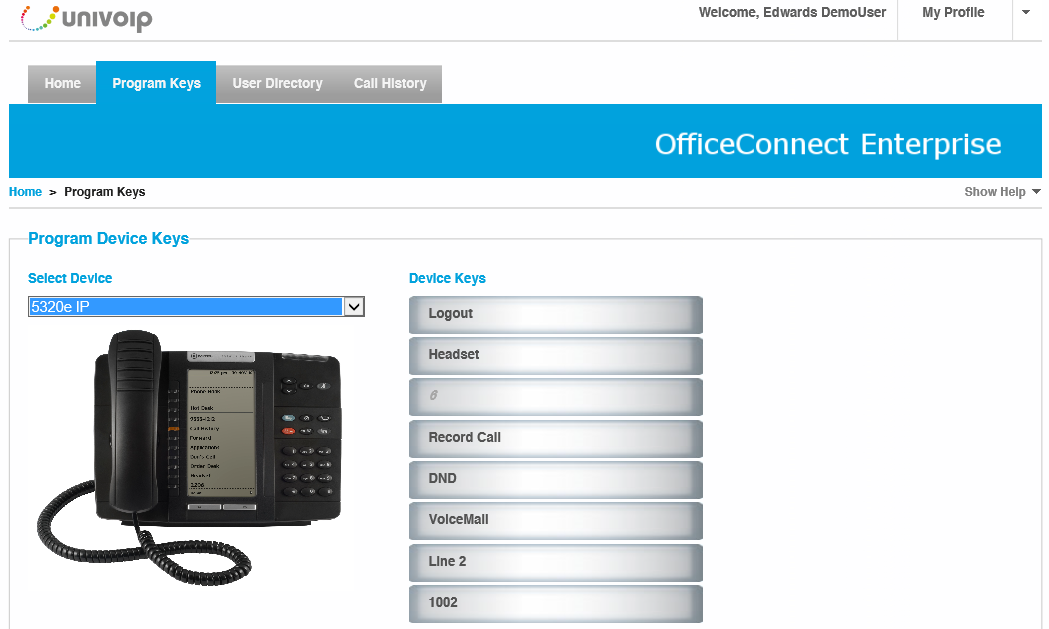
If your device is not displayed, select the correct device from the dropdown menu and ensure that the image shown matches your desktop phone.
-
The keys displayed on the right of the image correspond to the keys on your device
-
To program a key, click the one you want to set from the interface, then follow the instructions on the popup
Please note: Once you have programmed a key, the new functionality will become immediately available on your handset without requiring a reboot.
Feature Description List
ACD
An Agent can press this button...once pressed, options like "Make Busy" or "Log Out" will appear as available soft keys.
Call Forward Always
The Call Forward Always key turns toggles forwarding to the Call Forward Always number programmed on the site on and off. The Call Forward Always number can be programmed through desk phone's menu system.
Call History
The Call History key enables viewing of past incoming, outgoing, and missed calls from a desk phone.Call Park The Call Park key allows a caller to be placed in a special hold state which can be picked up by any person using Call Park Retrieve. The benefit of using Call Park versus transfer/hold is that the original extension dialed is free to receive more calls. After pressing the Call Park key, enter an extension to park the call on. The call can then be retrieved at that extension.Call Park RetrieveThe Call Park Retrieve key allows a user to retrieve a parked call. After pressing the Call Park Retrieve key, enter an extension on which the call is parked or press the corresponding DSS key. When prompted to enter the Parking Slot, enter the two-digit index number to retrieve a specific call or # to retrieve the longest parked call.Call PickupThe pickup key allows users that are part of a pickup group to answer the call of any other user in the pickup group.CDE Speed CallCDE Speed Call can be programmed to quickly dial another extension on the site. The maximum length of the speed dial number is seven digits and it cannot be an external call.Direct PageDirect Page allows another telephone to be paged over its built-in speaker, even if the telephone is in use.Do Not DisturbDo Not Disturb (DND) stops internal calls from ringing a telephone and returns busy tone to the caller or forwards to voicemail. System Options determine whether or not DND stops external calls from ringing. DND does not affect the ability to make calls.DSS/Busy LampThe Direct Station Select/Busy Lamp key can be set to an extension to watch whether it is ringing or on a call, and allows the extension to be picked up when it is ringing as well.Group ParkGroup Park allows a caller to be placed in a special hold state which can be picked up by any person using a similarly programmed Group Park key. The benefit of using Group Park versus transfer/hold is that the original extension dialed is free to receive more calls. When programming Group Park, an extension where the caller is to be held must be entered.Group PresenceGroup Presence allows members of call groups (Hunt, ACD, Ring, and Personal Ring) to make themselves absent or present in a group. Only members who are present in a group are offered calls to that group.HandoffHandoff allows a call to be automatically transferred from one twinning phone to another twinned phone. For example, if a mobile phone is twinning with a desk phone and a user is currently talking on the desk phone, then pressing handoff will call the mobile phone and allow the conversation to be continued on that phone.HeadsetWhen a desk phone is connected to a headset, pressing the Headset key will switch the call to the headset.HoldAllows a call to be placed on hold.Hot DeskingInvokes hot desk login, allowing another user to login to the device.Key SystemAdds the phone to the Key System Group for the entered directory number.Make BusyWhen enabled, the Make Busy key ensures that an ACD agent does not recieve any calls until Make Busy is disabled.Message Waiting IndicatorMessage Waiting Indicator is used to watch a voicemail box for messages as well as dial the voicemail box to review new or archived messages. Through the portal the Message Waiting Indicator can be programmed to voicemail boxes of any extension including a user's or a group's extension.Mobile lineFor 6930 and 6940 only. This will be the key representing the user's smartphone paired over Bluetooth.MulticallMulti-call keys are programmed against an extension and all users with the same Multi-call key extension will have their phones ring when that extension is dialed. Unless particularly specified, a Ring Group should be used instead of a Multi-call key since it provides the same functionality.Night ServiceIndicates and allows users to change the system's current service mode.PagePaging allows connections to loudspeaker or paging equipment to make an announcement.Personal PresencePresence allows the twinning of a twinned number to be toggled on and off. For example, if a mobile phone is twinned with a desk phone, then turning the presence off will stop the mobile phone from being twinned when the desk phone is called.Phonebook Phonebook lets you find a user's number in the system phone directory based on last name, extension number, department, and/or location, and then place a call to that user.Phone LockPressing the key locks the phone until the phone is unlocked using the user' pin.ReleaseAdds a release button to the phone.Record a CallIf the Record a Call feature is activated, pressing the Record a Call key will start recording the current call.Single LineSingle line keys allow for another line to be programmed for a phone set.Super KeyDesk phones typically have a Superkey button(blue button) on the phone. But, if another Superkey is required, this feature can be used to program the key.Transfer/ConferenceAdd a transfer/conference button to the phone.User Speed CallSpeed dial can be programmed to call both internal and external numbers. It is important to note that when dialing external numbers, the speed dial must be entered as the number would be dialed from a phone internal to the site.User Speed Call - PrivatePrivate Speed dial can be programmed to call both internal and external numbers. The difference between Private Speed Dial and a regular Speed Dial is that after the number is entered as a speed dial, it is impossible to view the number entered from the desk phone itself; making it secure for personal numbers. It is important to note that when dialing external numbers, the speed dial must be entered as the number would be dialed from a phone internal to the site.
Back to the Enterprise User Portal Menu