
Music on Hold
You can upload an audio file that callers will hear when they are placed on hold.
Please Note: One audio file can be uploaded for each "Site" that you have. A Site is a physical location that has been configured by UniVoIP Support to have a unique e911 address.
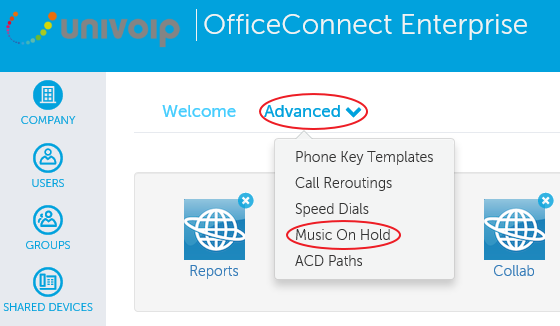
Click "Advanced", then click "Music On Hold".
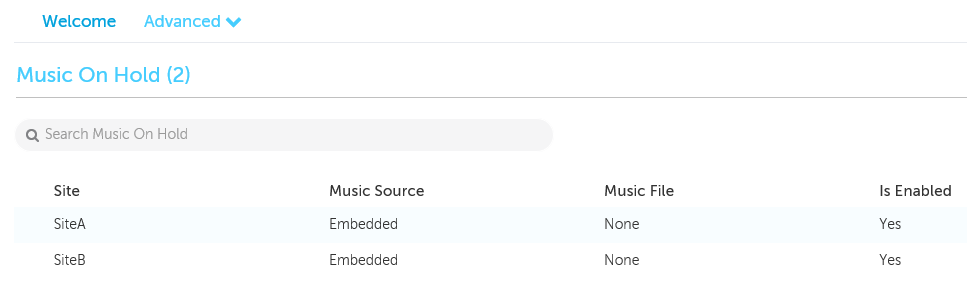
Click on the Site you want to change the Music On Hold file for.
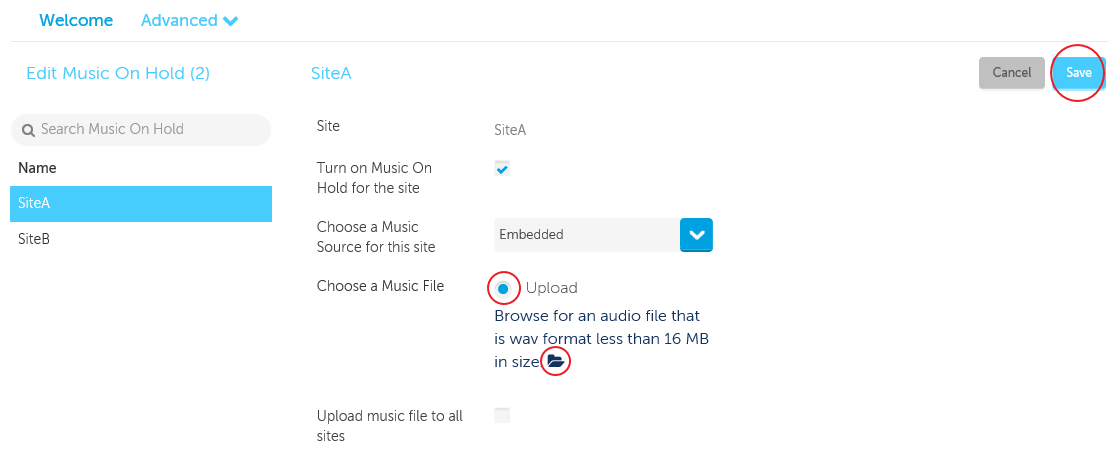
To have silence when callers are on hold, uncheck the box next to "Turn on Music On Hold for the site".
To upload an audio file
-
Click on the upload bubble to the right of "Choose a Music File"
-
Click on the File Folder Icon

-
On the pop up window, find and select your audio file
-
Click the "Save" button
Please Note: The audio file must be in "wav" format and less than 16 MB in size. It is your responsibility to ensure that your upload respects all Copyright Laws.
To update Music On Hold for your Audio Web Video (AWV) conferencing, please contact UniVoIP Support
Return to the Enterprise Admin Portal Main Menu