
Advanced Web Sharing View - Controls
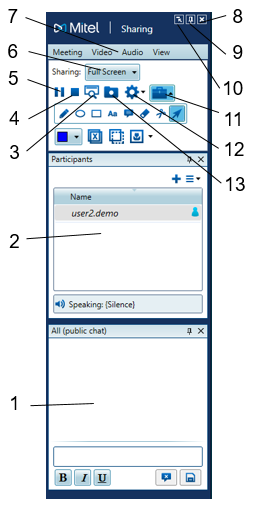
The Advanced View has all the functionality of the Basic View, but it also has dedicated areas for you to see the Participant List and Chat. If you like to use the Whiteboard a lot, the advanced view is for you.
-
Chat
-
Participants List
-
Preview. See a small box that shows the field of view of your participants
-
Stop Sharing
-
Pause Sharing
-
Change the area that you are sharing
-
Full Screen
-
Region
-
Application
-
-
Meeting Drop Down Menus
-
Stop Sharing
-
Auto Hide the Control Bar or keep it visible
-
Switch to Basic Sharing View
-
Show Whiteboard Tools
-
Display Settings
-
Record the conference
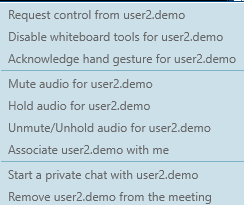
Right-click on a participant to get a pop up menu:
Back to the MiCollab Audio Web Video Conferencing (AWV) Menu