
You can assign and provision keys through the OfficeConnect Business Edition WebAdmin interface.
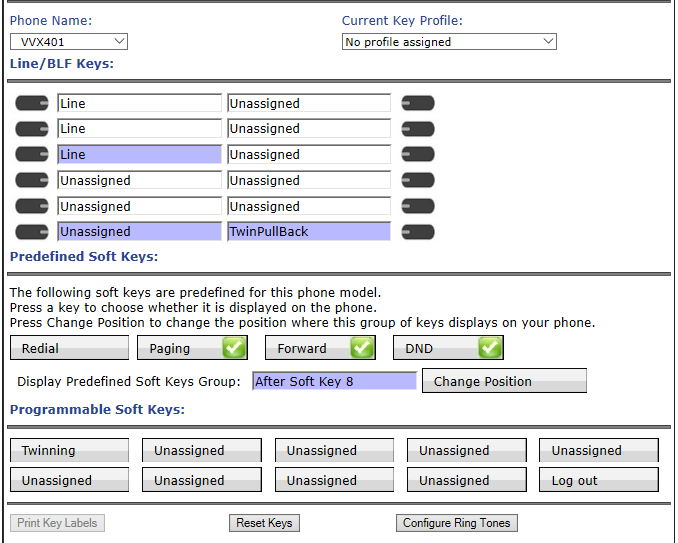
Line Keys
Each VVX phone has two predefined Line Appearance keys and a model-specific number of Line/BLF keys that you can configure as:
-
Monitor Extension
-
Line Key Speed Dials (Company or One Touch)
-
Pickup
-
Twinning Pullback
-
Unassigned
Please Note: A Line Key Speed Dial can be a “Company Speed Dial” for external contacts that your administrator has pre-loaded or it can be a “One Touch Speed Dial” for any internal or external number of your choosing.

The Company Speed Dial feature allows you to establish a call with a pre-selected phone number from your External Contacts by pressing the programmed phone key. When mapping the Company Speed Dial feature, you must select a name from the list box provided.

The One Touch Speed Dial feature allows you to make a call to the number entered in the details box when mapping this feature to a phone key. Pressing the programmed key establishes the call.
Soft Keys
Each Polycom VVX phone has five default soft keys, three of which can be toggled to enable and display features on your phone, including
The following OfficeConnect Business Edition features are programmable on the ten soft keys:
-
ACD SignIn/SignOut—see Programmable Memory Key Features
-
Directed Call Pickup
-
Forwarding Phones to Co-workers
-
Forward Phones to Coverage
-
Forward Phones to a Number
-
Forwarding Phones to Auto Attendant
-
Handsfree Answerback
-
Intercom to Co-worker
-
Intercom to Prompt
-
Join and Leave Call Groups—only available when the logged-in user is a group member of a group
-
On Demand Call Recording
-
One Touch Speed Dial
-
Outgoing Call Privacy
-
Primary Phone
-
Twinning
-
Unassigned—see Programmable Memory Key Features
Call/Phone Monitor are supported using Monitor Extension.
The following features are supported using native keys: