
To dial using One Click Calling, follow these steps:
-
Use the capture method you defined in
Configuration.
-
The application returns the Call popup.
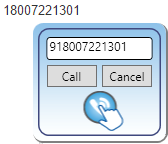
-
-
Optionally edit the number.
-
Click Call.
-
The application indicates that it is calling the number.
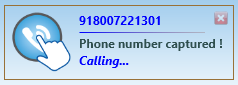
-
-
If you attempt to capture a number that is the same number of digits as your extension, One Click Calling interprets it as an internal extension, captures it, and allows internal one click dialing.
-
If the number is a 10 digit number, any leading "+" will be stripped off, and a "9" and "1" will be added prior to passing on the 12 digit number (9, then 1, then 3 digits for Area Code, then 7 digits for the phone number) to silhouette. It also strips off any spaces, brackets, hyphens and periods in the number.