
You can click to call your contacts after logging into your Web User Portal. The call will be presented on your system device, but you can enter an outside number when triggering a click to call if you want the system to present the call to you at that outside number.
To call a person or entry using click to call, follow these steps:
-
Click Personal Contacts, Internal Contacts, or External Contacts in the Navigation pane.
The system returns the Personal Contact page.
b. Click the Value.
-
For Internal Contacts, click the Extension.
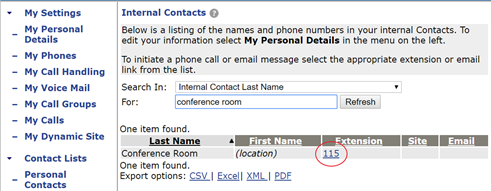
-
For External Contacts, click the Phone Number.
The system displays a Calling pop-up window, which includes the following fields:
2. Click Call.
If Custom # or Twinning # is selected, your twinned target rings and you have to select a line or pick up the receiver to initiate the call. If Confirm Before Dialing is enabled, press 1 to continue the call to its destination.
3. When the party you are calling answers the call, you can continue the call in speaker mode or you can lift the handset.
If your call is not answered, you have to terminate the call on your phone by lifting and replacing the handset or by pressing Speaker.