
The 5320e IP Phone's default phone window and keys are shown and described below. The Phone window provides access to programmable keys and the main phone interface.
Getting Started with Your Phone
When you receive your phone, you need to program features and applications. Press the Menu key 
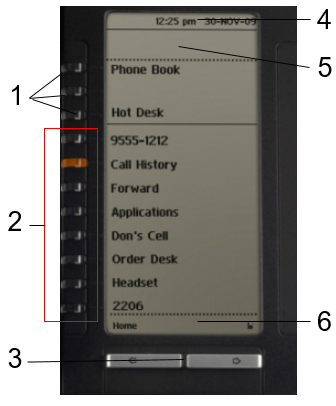
5320e IP Phone Window
5320e IP Phone Default Window and Keys
|
Feature |
Function |
|
1) Softkeys |
Allow you to access specific call control features, which are context sensitive. Non-programmable feature keys, which are specific to the application or state of the set. The 5320e provides three softkeys. |
|
2) Programmable Keys |
Launch specific call control features. Use the Settings application or the UC Express application to program these keys. The 5320e provides 7 programmable keys plus 1 prime line key. For instructions on programming the keys, see Programming Features on Your Keys. |
|
3) Navigation Page Keys |
Display additional pages of information. The 5320e has two page navigation keys: Back and Next. |
|
4) Status Line |
Displays time, date, and icons indicating feature states as follows:
|
|
5) Information Area |
Provides prompts in most phone applications. Content changes based on the application. |
|
6) Footer |
Shows context and summary information based on information in the Programmable Keys area, such as Page Indicators, numbers of items, and so forth. |


